
What are Frontend Client Extensions?
Frontend Client Extensions are like skins that overlay the core functionality, adding extra features and enhancing the appearance. They function like Oxygen OS on top of the standard Android system or a plugin in a code editor.
Why Frontend Client Extensions?
Liferay offers a robust platform for delivering your site to all clients. The platform's Out-Of-The-Box features use a WYSIWYG (What You See Is What You Get) approach, which simplifies the process, enabling quick content creation without the need for complex coding. However, this method comes with limitations, especially when creating forms for objects with relationships, like one-to-one or one-to-many. Like, if we have two objects, Author and Book, it is not possible to create an out-of-the-box (OOTB) form in Liferay that incorporates both objects simultaneously, even though an author can write many books.
To overcome this, Liferay provides a solution in the form of Frontend Client Extensions. This allows developers to build interactive user interfaces while leveraging Liferay's workflows, objects, actions, user authentication, notification templates, and headless APIs. With this approach, developers can focus on consuming the APIs provided by Liferay Objects through the Headless API, rather than worrying about complex back-end logic.
Frontend Client Extension in Liferay, how to create it?
A Frontend Client Extension acts as a UI layer that sits on top of Liferay's core functionality, without altering it. It can even be hosted on a separate server, as it only interacts with Liferay via REST endpoints. Frontend Client Extensions allow you to:

Develop reusable components for Liferay
Implement custom JavaScript and CSS
Integrate third-party libraries or frameworks
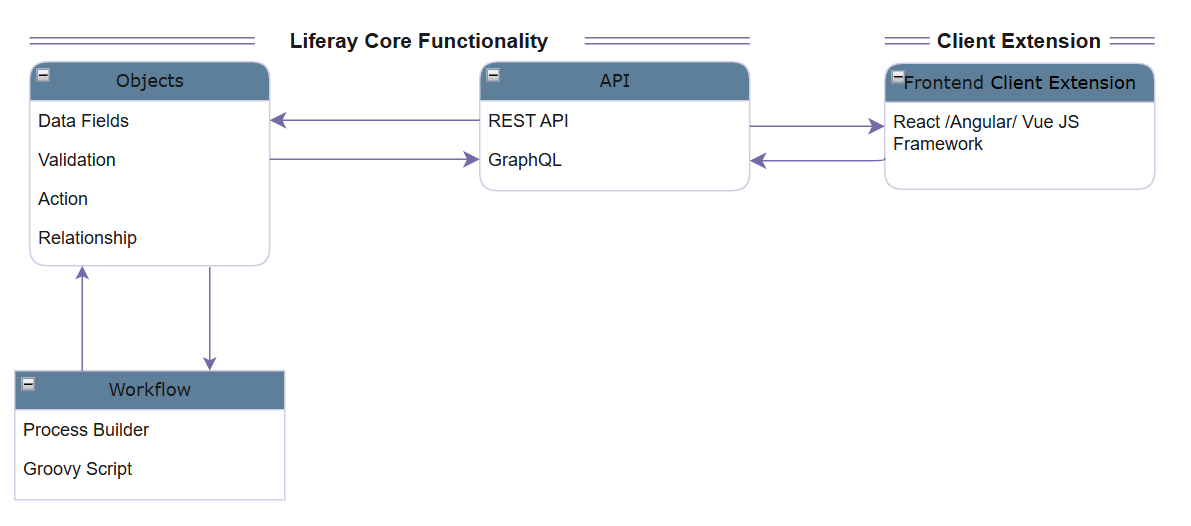
Popular frameworks like React, Angular, and Vue.js can be used depending on your project’s requirements.
Getting Started
1. Create a Workspace: Start by creating a workspace using Liferay Developer Studio.
2. Create a Client Extension Folder: In the workspace's root folder, create a Client Extension folder.
3. Generate a React App: Inside the Client Extension folder, generate a React app.
4. Create client-extension.yaml file: To build the app in Liferay, add the client-extension.yaml file in React App root folder.
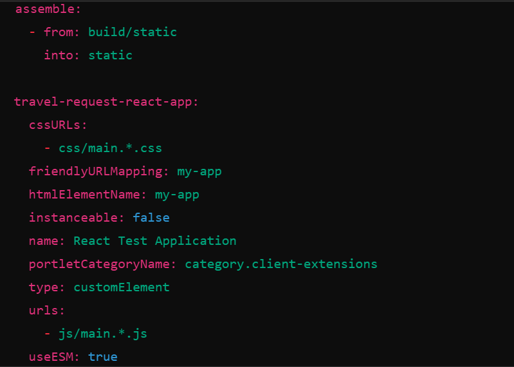
Alternatively, you can use the Blade command to generate both the workspace and React app.
5. Build the App: After making modifications, run the gradle build command from either Liferay Developer Studio or the command line to generate the zip file.
6. Deploy the Extension: Finally, move the generated zip file to Liferay's deploy folder.
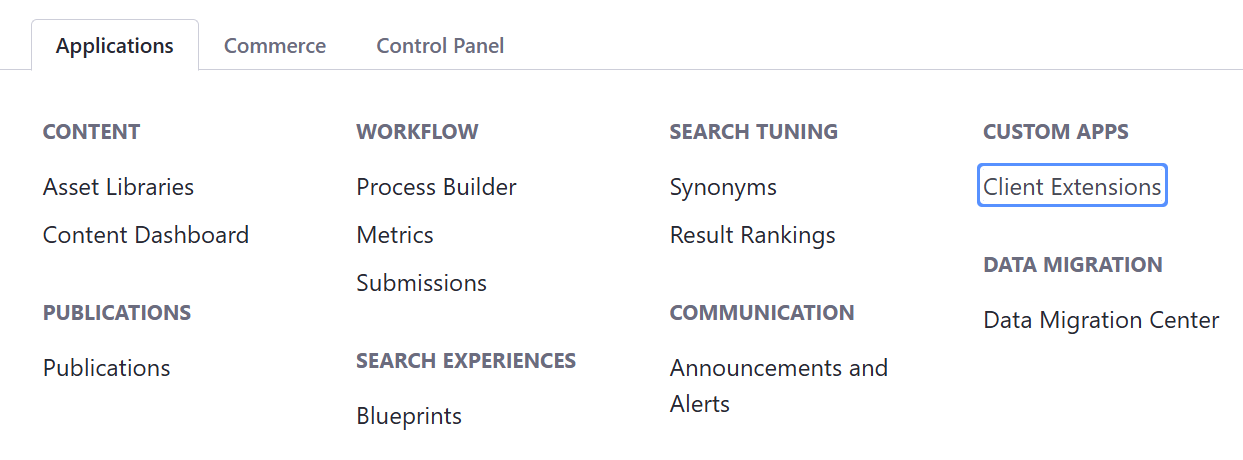
Once deployed, the Frontend Client Extension will be available on the Liferay server.
Benefits
Frontend Client Extensions in Liferay:Extend platform capabilities with customized, interactive UIs.
Decouples UI from Core: Separates UI layer from Liferay's core functionality.
Modern JavaScript Frameworks: Use React, Angular, or Vue.js for UI development.
Leverage Backend Services: Access Liferay’s backend via APIs while using modern frameworks.
Simplified Development: Reduces complexity and streamlines development.
Integration with External Libraries: Easy integration with external libraries and frameworks.
Steps for Building Components: Create a workspace, build a React app, and deploy using Liferay’s framework.
Reusable, Maintainable Components: Focus on creating reusable and maintainable components.
Enhanced User Experience: Improves the overall user experience with interactive, customized UI elements.
Frontend Client Extensions offer an ideal solution for tackling Liferay's limitations in handling complex relationships between objects and improving overall UI/UX design without compromising on Liferay's power and flexibility.